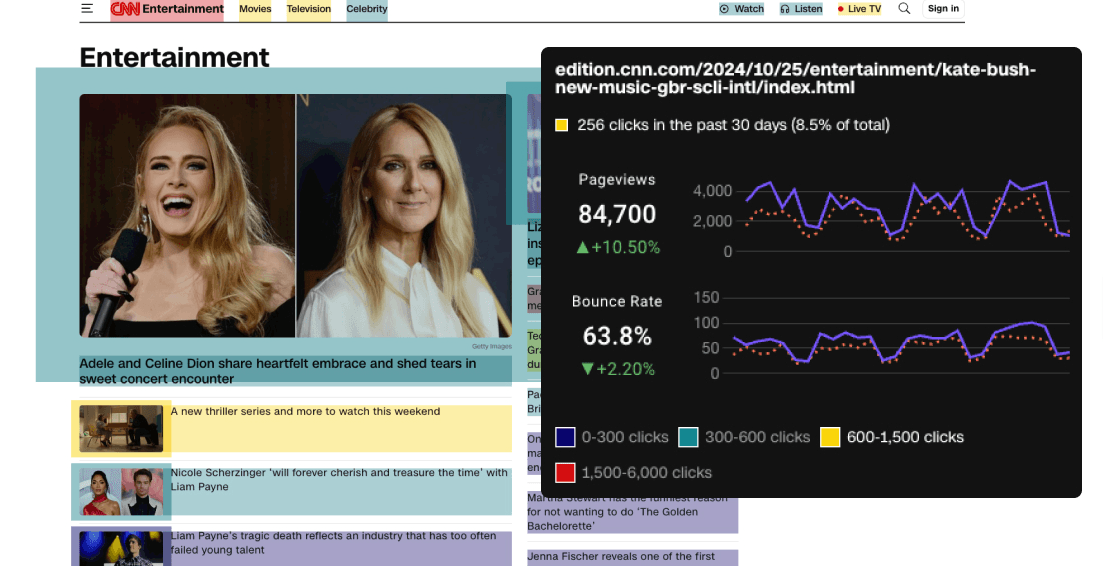
Learn why some links might not appear in your Page Analytics heatmaps and how to fix these tracking issues.
Overview
Page Analytics heatmaps highlight links to your other pages and external resources. Each link is highlighted with a color that indicates its visit frequency. Hovering over a link shows visit counts.
Issue 1: External Links Not Tracking
What's Happening?
External links (those pointing outside your website) may not be tracked by default in Google Analytics unless specific settings are enabled.
Symptoms
- Internal links (links to pages within your domain) show heatmap data
- External links (links to other websites) don't show any data at all
- No click data appears when hovering over external links
Root Cause
Google Analytics' Enhanced Measurement feature is either disabled or not properly configured. This commonly occurs after setting up a new Google Analytics 4 property or migrating from Universal Analytics.
How to Fix
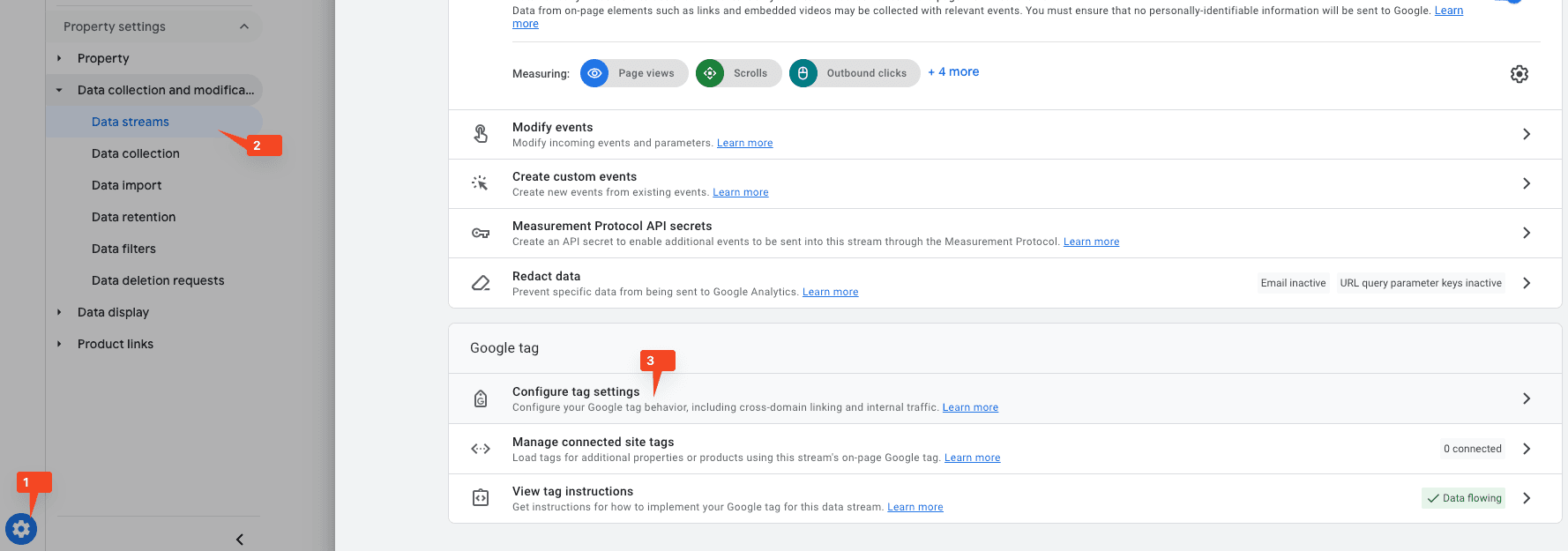
- Go to Google Analytics Admin settings
- Under "Data collection and modification", click "Data streams"
- Click on your data stream name
- Find the "Enhanced measurement" section and slide the switch to ON
- Click Settings and ensure "Outbound clicks" is enabled
Note: You must have Editor or higher permissions at the property level to enable enhanced measurement events.
Issue 2: Subdomain and Cross-Domain Tracking Issues
What's Happening?
Even with Enhanced Measurement enabled, certain subdomains and related domains might not be tracked as external links due to cross-domain tracking settings.
Symptoms
- Links to completely external websites (like social media) show tracking data
- Links to your subdomains (like blog.yoursite.com or help.yoursite.com) don't show data
- The issue persists even with Enhanced Measurement enabled
Root Cause
Your Google Analytics configuration treats these subdomains as part of your main domain through cross-domain tracking settings. While this helps track user journeys across subdomains, it prevents these links from being tracked as outbound clicks.
Common Examples
- help.example.com
- blog.example.com
- shop.example.com
How to Fix
- Open Google Analytics and select "Admin"
- In the left menu, find "Property settings"
- Under "Data collection and modification" section, click "Data streams"
- Select your data stream
- Scroll down and expand "Configure tag settings"
- Click "Configure your domains"
- Review your domain list and disable cross-domain tracking for domains you want to track as external links
Note: Disabling cross-domain tracking will affect how user sessions are tracked across your subdomains. Only do this if tracking subdomain clicks is more important than tracking cross-subdomain user journeys.
Need help balancing click tracking with cross-domain measurement?
Email me and I'll help you find the right setup.
Issue 3: Fragment Links Not Tracking
What's Happening?
Fragment links (also known as anchor links or hash links) that navigate within the same page aren't being tracked in your heatmaps. These are URLs containing a hash symbol (#) followed by an identifier.
Symptoms
- Links to other pages show heatmap data normally
- Links that navigate within the same page (#section-name) show no data
- No click data appears when hovering over fragment links
Root Cause
Standard Google Analytics tracking doesn't capture fragment link interactions because they don't trigger page views or navigation events. These links modify only the URL fragment without reloading the page.
Common Examples
- Table of contents links: #introduction, #chapter-1
- "Back to top" buttons: #top
- Tab navigation in single-page applications: #tab-1, #tab-2
- Section navigation in documentation: #installation, #usage
How to Fix
Set up precise heatmap tracking for all link interactions:
- Fragment/anchor links
- Dynamic navigation elements
- JavaScript-powered links
- Single-page application routing
Issue 4: Internal Links with rel="noreferrer" Not Tracking
Quick Fix:
Remove the rel="noreferrer" attribute from internal links on your website. This is safe to do for links pointing to your own domain and will restore heatmap tracking.
What's Happening?
Some internal links (links pointing to pages on your own domain) are not being highlighted in your heatmaps, even though Enhanced Measurement is enabled and other internal links work correctly.
Symptoms
- Most internal links show heatmap data and highlight correctly
- Specific internal links consistently show no data or highlighting
- The affected links have a
rel="noreferrer" attribute in their HTML - External links and other internal links work fine
Root Cause
Page Analytics highlights internal links by querying Google Analytics for all pages whose referrer is the current page. When a link has the rel="noreferrer" attribute, browsers don't send referrer information to the destination page. This means Google Analytics doesn't record the current page as the referrer, and Page Analytics can't retrieve click data for that link.
In other words: no referrer data = no way to match clicks in the heatmap.
How to Fix
Remove the rel="noreferrer" attribute from internal links on your website:
<!-- Before (not tracked) -->
<a href="/about" rel="noreferrer">About Us</a>

<!-- After (tracked correctly) -->
<a href="/about">About Us</a>
If you're using a content management system or framework that automatically adds this attribute, check your settings or template files to remove it for internal links.
Understanding rel="noreferrer"
The rel="noreferrer" attribute prevents the browser from sending referrer information to the destination page. This means the destination site won't know where the visitor came from, which can be important for user privacy when linking to external sites.
Note: This is different from rel="noopener", which prevents the destination page from accessing the originating page through the window.opener object (a security concern). While noreferrer historically implied noopener behavior in many browsers, they serve different purposes.
Is it safe to remove for internal links?
Yes! The rel="noreferrer" attribute is primarily valuable for external links to protect user privacy and prevent security risks with untrusted sites. For internal links (links to your own domain), you can safely remove it because:
- You already trust your own domain
- You likely want to track referrer data for analytics purposes
- There are no security concerns since you control both the source and destination pages
Keep it for external links
While it's safe to remove rel="noreferrer" from internal links, consider keeping it on external links for user privacy and security. You can selectively apply it only to links pointing outside your domain.