
Choose the right GA4 property
Page Analytics normally chooses a Google Analytics 4 property automatically. If the same website appears in several properties, that choice may not match the data you want. Your properties may also cover different parts of the website.
How automatic property selection works
When several GA4 properties report data for the same hostname, Page Analytics uses the property with the most recent weekly users. This works for most websites, but the automatic choice can be wrong when:
- An old, duplicate, development, or migration property reports the same hostname.
- An unusual traffic spike makes another property rank first.
- Each property intentionally tracks a different part of the website.
This selection only controls which property Page Analytics queries. It does not change data or settings in Google Analytics.
If Page Analytics chooses the wrong property
This case usually means several properties report the same pages, but one is the correct source for Page Analytics. You may see empty reports, unexpected totals, or data from an old property.
Email Roman with:
- The website domain.
- The correct GA4 property name or ID.
- The competing property name or ID, if known.
Page Analytics can set the correct property as the website default. A default property applies to requests that only identify the hostname. It is also the fallback for a full page URL when no more specific rule applies.
If different parts use different properties
Some websites use separate properties for storefronts, languages, brands, or sections. For example:
| Website path | GA4 property |
|---|---|
/ca/en | Canada storefront |
/us/en | US storefront |
/gb/en | UK storefront |
A single default property cannot represent this setup. Page Analytics can create named analytics sections and associate each one with a URL path. Send Roman:
- The website domain.
- Each GA4 property name or ID.
- One or more example URLs for each property.
- The property to use when only the hostname is available.
After configuration, Page Reports and the AI assistant show the analytics sections beneath one website. The website heading is not selectable. Choose the section whose data you want to use.
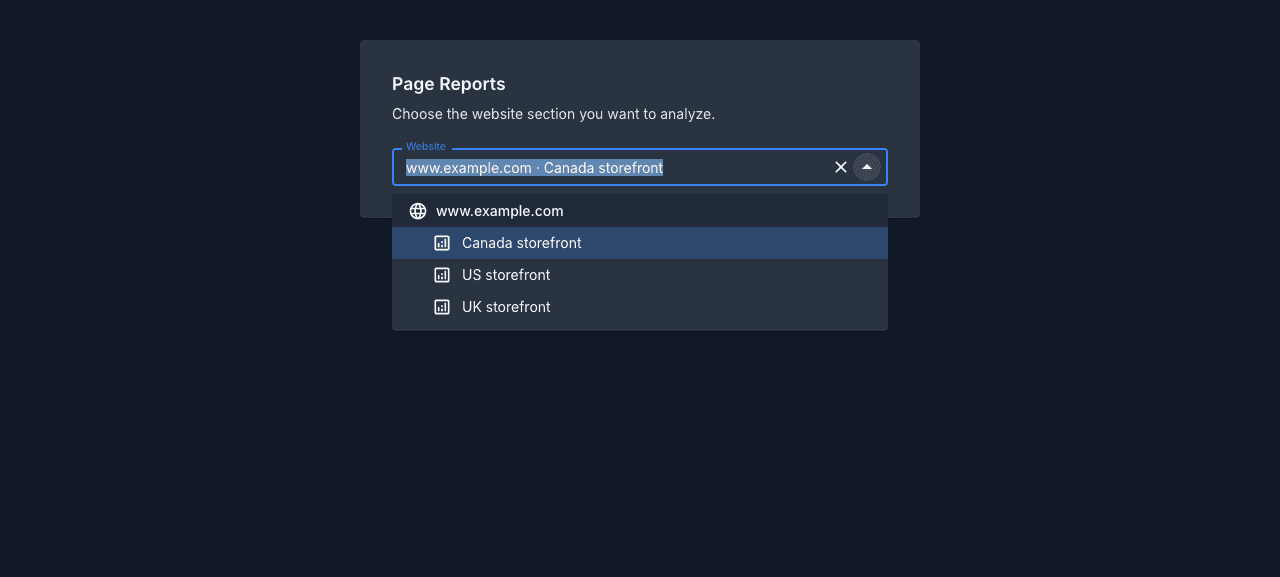
How configured selection works
When Page Analytics has the full page URL, such as in the extension, sidebar, or a heatmap, it evaluates the configured paths and chooses the property automatically. The most specific matching path wins. If no path matches, it uses the default property, then the normal automatic choice.
When the full path is unavailable:
- Page Reports and the AI assistant send the analytics section selected in the website picker.
- Other hostname-only requests use the configured default property.
- If no default exists, Page Analytics uses its automatic choice.
Path rules choose a GA4 property. They do not add a path filter to the GA4 report, so each property still returns the data it normally contains. Search Console data is unaffected by GA4 property selection.
After Roman configures the website
Reload the Page Analytics page or extension report. Full-URL features should choose the correct property without another prompt, and named analytics sections should appear in Page Reports and the AI assistant.
If a report is still empty, check that the selected GA4 property contains data for the hostname and page path you are viewing, then reply to the email thread with the affected URL.