
Billing and invoices
Page Analytics has one plan, available with monthly or annual billing. Lemon Squeezy processes the payments and is the Merchant of Record for each purchase.
Plans and charges
Your first 21 days are free, and you do not need to provide payment details for the trial. When the trial ends, you can subscribe for 9 USD per month or 90 USD per year. Both billing intervals include all Page Analytics features.
Your subscription renews automatically on the same billing interval until you cancel it. Lemon Squeezy calculates any applicable sales tax or VAT and shows the total before you pay.
How Lemon Squeezy handles payments
Lemon Squeezy is the Merchant of
Record. This means you buy the subscription from Lemon Squeezy, which processes the payment and
handles sales tax, VAT, refunds, and chargebacks. A Page Analytics charge therefore appears on your
bank statement with a
LEMSQZY* descriptor.
Use the Lemon Squeezy billing portal to update your payment method, manage the VAT number for future payments, or cancel your subscription. If you cancel, Page Analytics remains available until the end of the period you have already paid for.
Invoice name, address, note, and VAT number
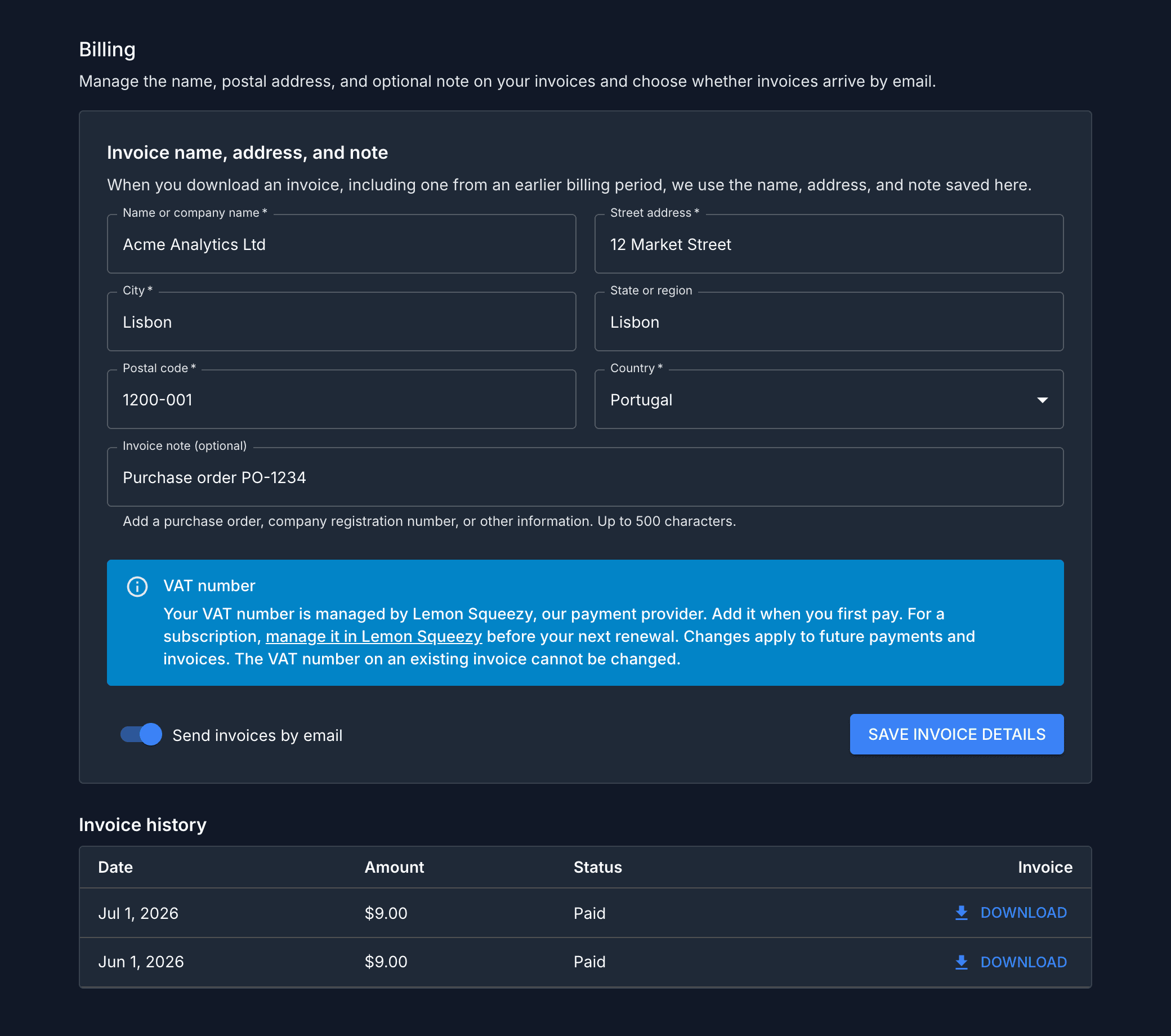
Open Account Settings and find Billing. Save the name or company name and postal address that should appear on your invoices. You can also add an optional invoice note, such as a purchase order or company registration number. Page Analytics uses the currently saved name, address, and note whenever it generates an invoice, including an invoice from an earlier billing period.
Lemon Squeezy manages VAT numbers separately. Add your VAT number when you first pay, or update it in the billing portal before your next renewal. A change applies to future payments and invoices. The VAT number on an existing invoice cannot be changed.
Receiving and downloading invoices
Send invoices by email is on by default. While it is on, Page Analytics sends a PDF invoice to your Page Analytics account email after each successful payment if you have saved an invoice name and address. If those details are missing, the email links to Billing so you can add them and download the invoice.
Invoice history lists invoices from your current and previous subscriptions. Select Download to generate a PDF with the name, address, and optional note currently saved in Page Analytics. You can update those details and download an earlier invoice again.
Refunds
Page Analytics has a no-questions-asked refund policy:
- Ask within 30 days of a payment for a full refund.
- After 30 days, ask for a refund of the unused part of the period you paid for.
Email roman@pageanalytics.io from your Page Analytics account email and identify the payment you want refunded. Lemon Squeezy processes the refund as the Merchant of Record.
The terms of service contain the full refund terms and information about statutory rights.